
The Distributor Data Problem: Automating Secondary Sales Extraction Across Dozens of File Formats
Huzefa Motiwala July 4, 2026
TL;DR
- File-format normalization, not parsing or AI models, is the real engineering problem in secondary sales data extraction.
- Document AI reads invoice headers fine, but the worst tool in a public benchmark dropped to around 40% accuracy on line items, where the revenue signal lives.
- General trade drives roughly 70-75% of Indian FMCG sales across an estimated 13 million kirana stores, so the messy files are the market.
- A canonical schema plus contract tests per distributor absorbs format drift; per-file scripts quietly rot.
Secondary sales data extraction turns the files distributors send you, Excel workbooks, CSV dumps, Tally and ERP exports, scanned PDFs, pasted email tables, into one clean stream of validated invoice-line records. It is one stage of the wider stack we map in the complete secondary sales automation guide. Reading one file is easy. Reading dozens of subtly different layouts that drift over time is the job. The real problem is file-format normalization, not the model. Teams that treat it as an afterthought ship reports that look precise and are quietly wrong.
If you sell through distributors, you know the shape of this. You book the primary sale and still barely know what moved off the shelf below your distributor. In Indian FMCG, where general trade drives roughly 70 to 75% of sales across an estimated 13 million kirana stores, that gap is the largest source of hidden revenue leakage. Field teams report through Excel, WhatsApp, and phone, so headquarters often sees data that’s already 7 to 10 days old.
What should you take away from this?
We build and rescue the application layer for teams like this, and we’ve watched enough pipelines break to know where the difficulty sits. Not the parser. Accepting that you don’t control the input.
- The bottleneck is normalization, not parsing or AI. Design for variance across dozens of uncoordinated producers.
- Data arrives from four channels, DMS or ERP exports, SFA apps, raw spreadsheets, documents, each failing differently.
- Excel is hostile to structured data, mangling gene names in nearly one in five studied genetics papers.
- Document AI drops invoice line items, as low as 40% accuracy, while reading headers fine.
- Two decisions carry the system: one canonical schema, and a contract check at the boundary.
Why is file-format normalization the real problem?
Format variance isn’t a phase you pass through. It’s the permanent condition your system runs in. You’ll onboard a distributor whose CSV is really an HTML table, and another who pastes a grid into an email body with no attachment. None warn you, and last month’s layout can change overnight.
The tooling distributors use fights structured data. Excel silently turns codes into dates and long numbers into scientific notation. A 2016 study in Genome Biology found 19.6% of genetics papers with gene lists had symbols corrupted this way; a later scan of 10,000-plus papers put it above 30%. If the most peer-reviewed data on earth loses this fight, a distributor’s export won’t. So never trust the file. Detect what it is, and validate what it contains, before a record moves downstream.
Where does distributor data come from, and how does each source fail?
Stop treating file formats as one bucket. Sort by where the data originates, because origin predicts the failure mode. Secondary sales reaches you through four channels, cleanest first.
- Structured system exports (DMS and ERP). A distributor on a DMS, or exporting from Tally, Busy, or an ERP, gives consistent columns and real invoice lines. The catch is coverage: only organized distributors run it.
- SFA app captures. Sales force automation apps log secondary sales at the salesperson’s visit. Timely and geo-stamped, but they reflect what was ordered on the beat, not always what the distributor billed.
- Raw distributor spreadsheets. The largest, messiest channel. Hand-maintained Excel and CSV with merged cells, branding rows, multi-sheet workbooks, and layouts that shift whenever someone edits the template. Normalization earns its keep here.
- Documents, PDFs, and email tables. Scanned invoices, printed stock statements, tables pasted into email. Hardest to make reliable, likeliest to be silently incomplete.
Which extraction approach breaks on which input?
Every method works on clean input. The question is how each fails on the input you’ll actually receive, and none wins across all four channels.
| Approach | Best-fit source | Primary failure mode | What it costs in production |
|---|---|---|---|
| Direct DB / API / DMS sync | Organized distributors on a DMS or ERP | Coverage, only reaches distributors who adopt the software | Long-tail distributors still send files; you cannot retire the file path |
| Schema-mapped spreadsheet parser | Recurring Excel and CSV from known distributors | Silent layout drift; type coercion of dates and leading zeros | Wrong-but-plausible records unless a contract check fails loudly |
| Generic “universal” importer | One-off or ad-hoc files | Header-guessing and delimiter or encoding misreads | High manual cleanup rate; false confidence in auto-mapped columns |
| Document AI / OCR for PDFs | Scanned invoices and stock statements | Line-item extraction lags header extraction badly | Correct totals with missing rows, the most dangerous failure of all |
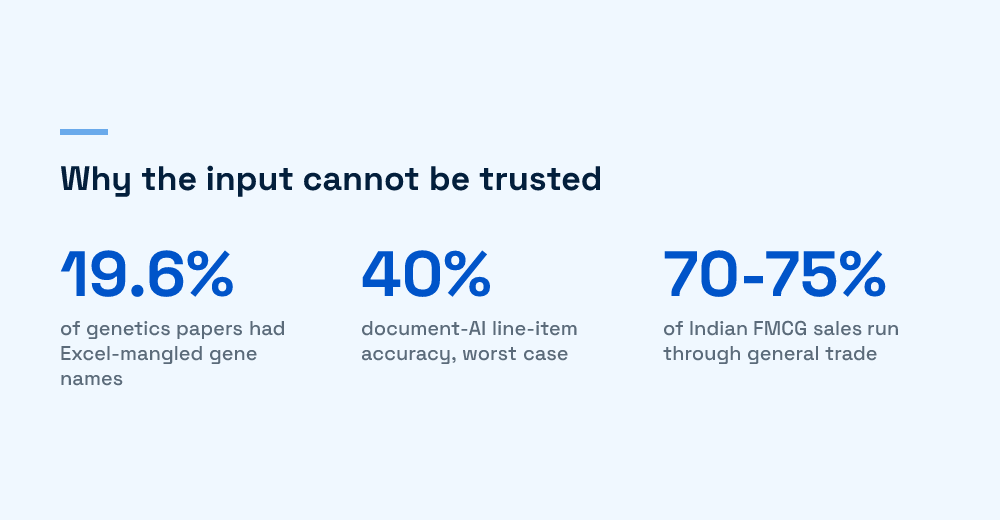
The PDF row deserves emphasis. In a public invoice benchmark, tools like Azure Document Intelligence and GPT-4o hit the 90s on field-level accuracy, but line items were where they split: Azure held at 87% while Google Document AI, the worst case in the benchmark, dropped to around 40%. A tool reads the invoice number, date, and total perfectly while dropping three of twelve lines, and the total may still reconcile. So we treat any PDF record as provisional until the line sum checks against the stated total. That extraction layer, not the model, is where these systems fail, as we cover in why enterprise document AI fails at the extraction layer and our LLM versus traditional OCR comparison.
What failure modes does the estimate miss?
The estimate covers the happy path: read the file, map the columns, load the records. The overruns live below, and we’ve hit every one in client work. Each produces plausible output, which is what makes it expensive.
- The extension lies. A secondary.xlsx is a CSV; a .csv is tab-delimited; a workbook is an HTML export. Content-sniffing the real type at ingestion kills a class of first-week incidents.
- Dates parse into the wrong day. 03-04-2026 is 3 April or 4 March by locale, and a distributor who switches machines can flip convention mid-year. Pin the format per source.
- Encoding mismatches. UTF-8 read as Latin-1 turns retailer names to garbage; a stray byte-order mark shifts the mapping by a column. Standardize inputs to UTF-8 at the boundary, as CSV import guides recommend.
- Multi-sheet and merged-cell traps. The real data sits on sheet three under branding rows, or a subtotal row looks like data. A parser assuming row one is the header imports the wrong grid.
- Format drift with no announcement. A distributor upgrades billing software and every column name changes overnight. Without a contract check, the pipeline emits blank or shifted records for days.
The dangerous failure isn’t the crash; a crash tells you something’s wrong. It’s the file that parses cleanly into wrong data and flows into a forecast or a trade-scheme payout before anyone questions it, the last-mile capture gap we dig into in primary versus secondary sales data.
What two decisions make the pipeline survive?
The pattern that holds comes down to two choices. One canonical schema. Contract testing at the boundary. Get both right and format drift stops being a fire.
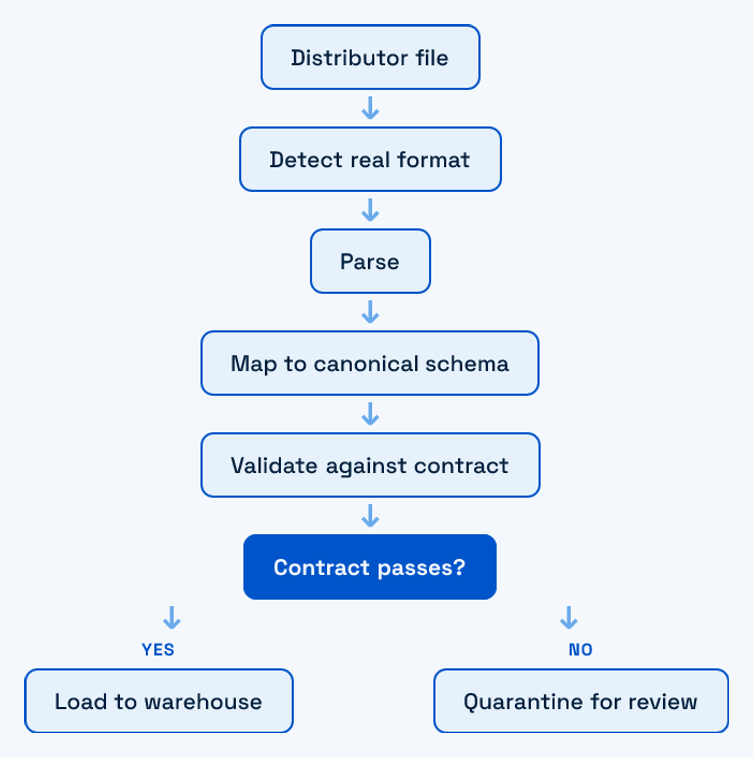
Define the canonical schema before any mapping is written. Decide the exact fields your reports and ERP need, invoice date, retailer, product code, quantity, unit, value, once. Every source maps to it. The mappings live as versioned configuration per distributor, not branching code, so a layout change is a config edit with an audit trail, not a deploy. That build-on-what-the-system-can-absorb approach also shapes our Excel-and-WhatsApp migration playbook.
Then run contract testing at the boundary. Every file is checked against the expected shape before its records are trusted: column presence, header position, types, and line items summing to the invoice total. On failure, the file routes to an exception queue with a specific reason, and the raw input is stored unchanged so it can be replayed once the mapping is fixed. Separate the failure types. A parser error, a mapping mismatch, and a business-rule violation are three problems with three owners. Collapse them into one “import failed” bucket and teams lose hours guessing where the fault sits.
Do those two things and format drift becomes a five-minute mapping update behind a clear alert. The rest, clever OCR and fuzzy matching, is optional. The schema and the contract are not, as our pharma secondary-sales pipeline breakdown shows. If you’re staring at a folder of distributor spreadsheets and a report you no longer trust, that’s a conversation we’re happy to have, no pitch, just a look at where your pipeline is leaking.
Frequently Asked Questions
What is secondary sales data extraction?
Secondary sales are the sales from a distributor to the retailers below them, the second hop after the primary sale from brand to distributor. Extraction pulls that data out of whatever files the distributor produces (Excel, CSV, ERP or Tally exports, PDFs, email tables), normalizes product codes, dates, and units into one schema, and validates it before it reaches your reports or ERP. It matters because primary sales tell you what you shipped, while secondary sales tell you what actually sold through, which is the number that should drive replenishment and forecasting.
Why is normalizing distributor file formats so hard?
There is no standard. Each distributor exports from a different system with different column names, date formats, product-code conventions, and encodings, and those layouts change without warning. Excel actively works against you by converting codes to dates and long numbers to scientific notation. A 2016 study found nearly a fifth of genetics papers with gene lists had symbols mangled this way, and a later survey put it above 30%. If the most-scrutinized data in the world breaks on this, distributor Excel files certainly do. The fix is a per-source mapping layer plus strict validation, not a single universal parser.
Should we build extraction ourselves or use a DMS or SFA product?
A DMS or SFA tool solves this well when your distributors will run the vendor’s software and let it sync secondary stock and sales; some integrate directly with distributor Tally or Busy installs. The problem is the long tail of distributors who adopt nothing and keep emailing spreadsheets. For them you still need custom extraction. In our client work the pragmatic answer is usually both: buy the DMS or SFA for distributors who will use it, and build a small, well-tested ingestion layer for the ones who only ever send files. We lay out the full trade-off in our build versus buy piece.
How do we handle a distributor that suddenly changes its report layout?
Assume it will happen and design for it. Store each source’s mapping as versioned configuration, not code, so a layout change is a config edit rather than a deploy. Run a schema-contract check at ingestion that fails loudly when the incoming columns, header row, or types no longer match the expected shape, so a changed layout routes to an exception queue instead of silently producing blank or shifted records. Keep the raw file unchanged so you can replay it once the mapping is fixed. The goal is that format drift becomes a five-minute update with a clear alert, not a week of wrong reports nobody noticed.
Where does automated extraction usually go wrong first?
The most common failure is trusting the file extension and header. A file called sales.xlsx can be an HTML table Excel happens to open, a CSV renamed, or a workbook with the real data on the third sheet below merged-cell branding. The second is date and number coercion: MDY versus DMY ambiguity turning 03-04 into the wrong day, and codes losing leading zeros. The third is PDF line-item extraction, where even strong document-AI tools score far lower on line items than on header fields, so a scanned invoice can return a correct total with three missing rows. Each produces plausible output, which is why validation matters more than clever parsing.

Huzefa Motiwala
Huzefa Motiwala is a co-founder of AlterSquare, an application-layer partner that helps SaaS and tech-led companies stabilise, modernise, and extend complex systems without breaking what already works. He comes at software from design and frontend, with a focus on data-heavy interfaces and on getting real teams to actually adopt what gets built — not just ship it. He writes about working in fragile, high-stakes codebases: incremental change over risky rewrites, UX and technical debt, and embedding AI into real workflows.








Leave a Reply