
Build vs Buy: Choosing a Secondary Sales Automation Stack for a Distributed Field Force
Huzefa Motiwala July 6, 2026
TL;DR
- Buy the SFA/DMS layer, build only the ingestion-and-reconciliation glue that ties it to your systems.
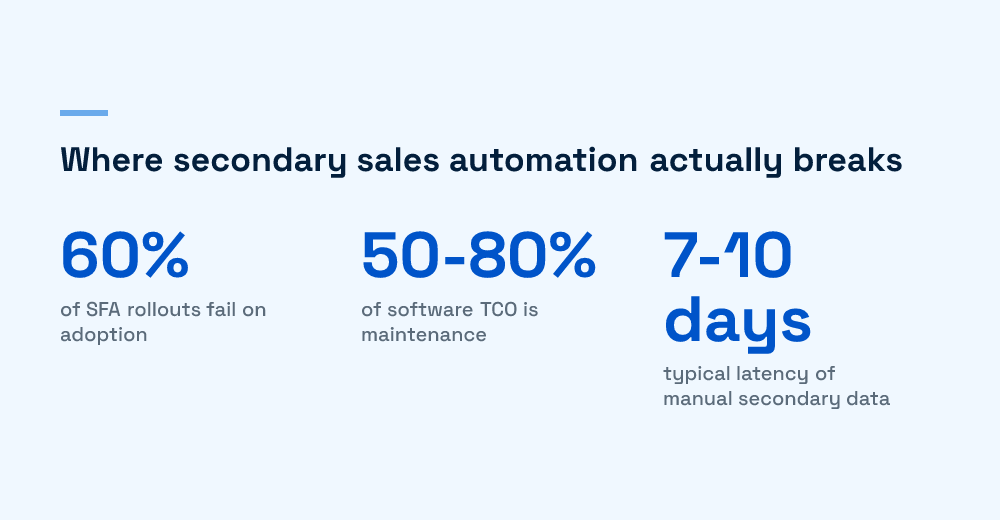
- Roughly 60% of SFA rollouts fail on field adoption, not on broken code; a demo hides both risks.
- Maintenance eats 50-80% of a custom build’s total cost of ownership, about 15-25% of build cost every year.
- With 25-35% annual field-sales attrition in Indian FMCG, you re-onboard up to a third of your users onto the tool every year.
For most distributed field forces, buy the sales-force and distributor-management layer, and build only the ingestion-and-reconciliation glue that connects it to your systems. (New to the stack? Start with our complete guide to secondary sales automation.) A packaged platform gets reps live this quarter; a full custom build rarely repays its maintenance bill. Secondary sales automation does not fail on file parsing. It fails on two things a demo hides: whether reps still open the app in week three, and whether your team can absorb the distributor data drift that never stops.
- Roughly 60% of SFA rollouts fail on adoption, not on broken code.
- Maintenance is 50% to 80% of a system’s total cost of ownership.
- Manual secondary data reaches HQ 7 to 10 days late, sometimes 20 to 30.
- The durable answer is hybrid: buy the field app, build the reconciliation glue.
Why is secondary sales automation an adoption problem, not a data problem?
Primary sales, brand to distributor, is clean because it is billed. Secondary sales, distributor to retailer, is where visibility goes dark, and it is the number your field force exists to move. Closing it needs reps entering orders and files reconciling against them. The stakes climb further in regulated verticals; pharma’s tiered pipeline is the sharpest example. Adoption, not ingestion, decides whether that data is trustworthy.
Roughly 60% of SFA implementations fail because the team stopped using the tool, not because the software crashed. FMCG field-sales attrition in India runs 25% to 35% a year, so you re-onboard a third of your users annually onto what many were sold as a tracking device. An app nobody opens yields guesswork, which is why the last mile of secondary sales data is hardest to capture.
Why field reps quietly abandon the app
Across rollouts we have helped recover, the reasons are consistent:
- Built for a leadership demo, not a rep working thirty outlets a day.
- It feels like surveillance instead of saving time on the visit.
- No real offline mode, so it stalls when the order is placed.
- No language or low-literacy support for Tier 2 and Tier 3 markets.
So we push back when a client frames this as build a pipeline for distributor files. What sticks starts from the other end: what the rep taps at the outlet, and whether that yields trustworthy data as a by-product. That shapes our work on designing UI for heavy data workflows, and since attrition hides adoption decay, watch the early metrics that signal a resistance problem.
Does building in-house actually cost less than buying?
Usually not, once maintenance is counted. The build wins the first meeting on sticker price. The trap: software maintenance consumes 50% to 80% of total cost of ownership, roughly 15% to 25% of build cost each year. A down payment, not the price, as we argued on the real cost of building it in-house.
Why the maintenance load runs so high here
Distributor files are a moving target, so a parser you own is never finished:
- Headers shift when a distributor tweaks a report template.
- A distributor upgrades their ERP and the export format changes overnight.
- Someone merges cells in a monthly report and the pipeline breaks.
A packaged DMS amortises that cost across every customer; own the parser and you carry it alone. We watched a weekend script harden into a two-person standing commitment within a year, the same trap behind why every no-code app eventually needs real developers. The honest comparison is a three-to-five-year total cost of ownership, not a build quote against annual licences.
What is the “buy the app, build the glue” third path?
Treating this as binary is the most common mistake. The durable answer is hybrid: buy where the market has already solved the hard, adoption-heavy problems, and build the thin layer where your business genuinely differs.
Buy the field-hardened layers
You inherit years of field learning here:
- The field app (SFA): offline-first order entry, GPS-verified visits, route planning, and multilingual interfaces.
- The distributor-management layer (DMS): stock-and-sales capture, scheme and claim handling, and primary order flow.
Build the layer that encodes your business
Build the ingestion-and-reconciliation glue between that stack and your ERP:
- Your SKU master, territory model, and bundle logic.
- The normalisation layer that maps every distributor format into one canonical shape, covered in our note on automating secondary-sales extraction across dozens of formats.
- The reconciliation identity: Opening Stock plus Primary Purchases minus Closing Stock equals Secondary Sales, before returns.
- A full audit trail: timestamps, correlation IDs, and row-level lineage.
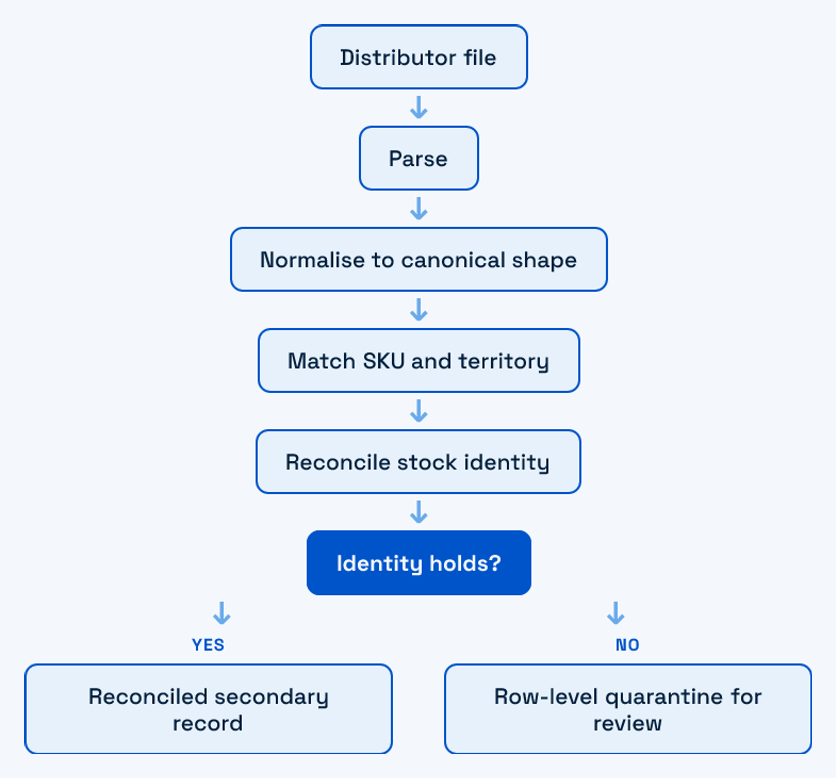
When a file violates that identity, you want the rule in code you control, not a vendor’s black box. Owning the glue keeps you off one vendor’s data model, echoing our take on the long-term cost of proprietary data formats: own your canonical model even when you rent the app around it.
How do you score the build-vs-buy decision?
Build-vs-buy debates stall because people weight factors differently and never say so. Score each dimension for your situation before anyone advocates. The point is not the exact scores but an honest read on every row.
| Dimension | Lean buy (packaged SFA/DMS) | Lean build (custom) | Why it moves the needle |
|---|---|---|---|
| Time to field | Reps live this quarter | Multi-quarter runway is fine | Blind stock decisions every month without data |
| Field-force size and attrition | Large team, 25% to 35% churn | Small, stable, technical team | Churn makes adoption UX beat any custom feature |
| Distributor file variety | Many formats, constant drift | Few, standardised templates | Owned parsers pay a forever maintenance tax |
| Reconciliation and SKU logic | Standard industry rules | Unusual bundle or territory logic | Only unusual logic is worth building |
| Engineering capacity | No spare data engineers | Data or DevOps capacity to spare | Maintenance is 15% to 25% of build cost yearly |
| Data ownership and compliance | SaaS or API acceptable | Must self-host every layer | Self-hosting rules can force a build |
Most rows for a large distributed field force point at buying the app. The build column usually wins only on reconciliation logic and self-hosting, which is why the hybrid scores best. If it wins every row, be suspicious: maintenance and adoption cost has probably not been priced in.
What failure modes break secondary sales stacks?
Four break in production more than any others, whichever path you pick. The through-line: protect the data before the dashboard, and never let one bad row or vendor backlog hold the pipeline hostage.
- The dashboard-first inversion. Reporting demos well, so teams build it first, then find the ingestion beneath it unreliable. A dashboard on shaky data launders bad numbers into confident charts. Intake comes first.
- The all-or-nothing file failure. One malformed row rejects a distributor’s whole monthly file, so ops hand-fixes it under deadline. The fix is row-level quarantine: flag the bad row, let the rest flow.
- The data-latency blind spot. Weekly Excel-and-WhatsApp reporting reaches HQ already 7 to 10 days old, and 20 to 30 days behind through manual channels. By then a stockout has sent that retailer to a competitor, which is why moving off Excel and WhatsApp onto a real platform is a data-quality decision.
- The vendor-roadmap hostage. On a pure-buy path, an edge case you depend on sits in the vendor’s backlog behind every other customer. Logic specific to you should never need a support ticket to change.
How do you make the call this month?
You do not need a six-week evaluation. For most large distributed field forces the call resolves the same way.
- Default to buying the SFA/DMS layer unless your field force is small, stable, and technical, or regulation forces self-hosting.
- Build the ingestion-and-reconciliation glue so your canonical model and audit trail stay yours.
- Favour the stack you can still run reliably twelve months after launch.
We have worked this call; the answer is rarely the first spreadsheet’s. If you are in that spot, start a conversation, no pitch, just a look at your distributor mix and the risk.
Frequently Asked Questions
Should we build or buy a secondary sales automation stack for a distributed field force?
For most distributed field forces the answer is a hybrid: buy the sales-force automation (SFA) and distributor-management (DMS) layers, and build only the ingestion-and-reconciliation glue that connects them to your ERP and data warehouse. Buy the app because you inherit years of field hardening, offline order entry, multilingual interfaces, and route planning, which directly drives rep adoption, where most projects fail. Build the glue because it encodes your specific SKU master, territory model, and reconciliation rules, keeping your canonical data and audit trail under your control. A full custom build only makes sense when your field force is small and technical, your distributor formats are standardised, or regulation forces you to self-host every layer.
Why do so many sales force automation (SFA) rollouts fail?
Roughly 60% of SFA implementations fail, and the failure is almost never technical. The software works, but the field team stops using it. The recurring causes are apps designed for a demo rather than for a rep doing thirty outlet visits a day on a weak connection, tools sold to reps as tracking rather than as something that makes their day easier, and missing language support for Tier 2 and Tier 3 markets. Frontline FMCG field-sales attrition of 25% to 35% a year compounds the problem, because you are constantly re-onboarding new reps. If adoption drops, your secondary sales data becomes guesswork no matter how good the pipeline behind the app is.
Isn’t building in-house cheaper than paying vendor licences?
Usually not, once you account for maintenance. Across industries software maintenance consumes 50% to 80% of total cost of ownership, with annual maintenance running about 15% to 25% of the original build cost and complex on-premises systems reaching 70% to 90% of lifetime spend. Secondary sales stacks are especially maintenance-heavy because distributor file formats drift constantly, and every header change or new ERP template lands on your team when you own the parser. The honest comparison is a realistic three-to-five-year total cost of ownership against packaged licensing, not a one-time build quote against a stack of annual fees. On that basis, “cheaper to build” survives far less often than it appears.
How does distributor data latency affect field-force decisions?
When secondary sales data reaches headquarters through weekly Excel-and-WhatsApp reporting it is commonly already 7 to 10 days old, and through purely manual distributor channels it can lag 20 to 30 days. In that window a stockout in a high-demand district has already pushed the retailer to a competing brand, and you only learn about it after the damage is done. This is the core argument for same-day, rep-entered capture at the outlet rather than relying on distributor-side files alone, and it is why the field app’s usability is a data-quality decision, not just a user-experience nicety.

Huzefa Motiwala
Huzefa Motiwala is a co-founder of AlterSquare, an application-layer partner that helps SaaS and tech-led companies stabilise, modernise, and extend complex systems without breaking what already works. He comes at software from design and frontend, with a focus on data-heavy interfaces and on getting real teams to actually adopt what gets built — not just ship it. He writes about working in fragile, high-stakes codebases: incremental change over risky rewrites, UX and technical debt, and embedding AI into real workflows.




Leave a Reply